The bar
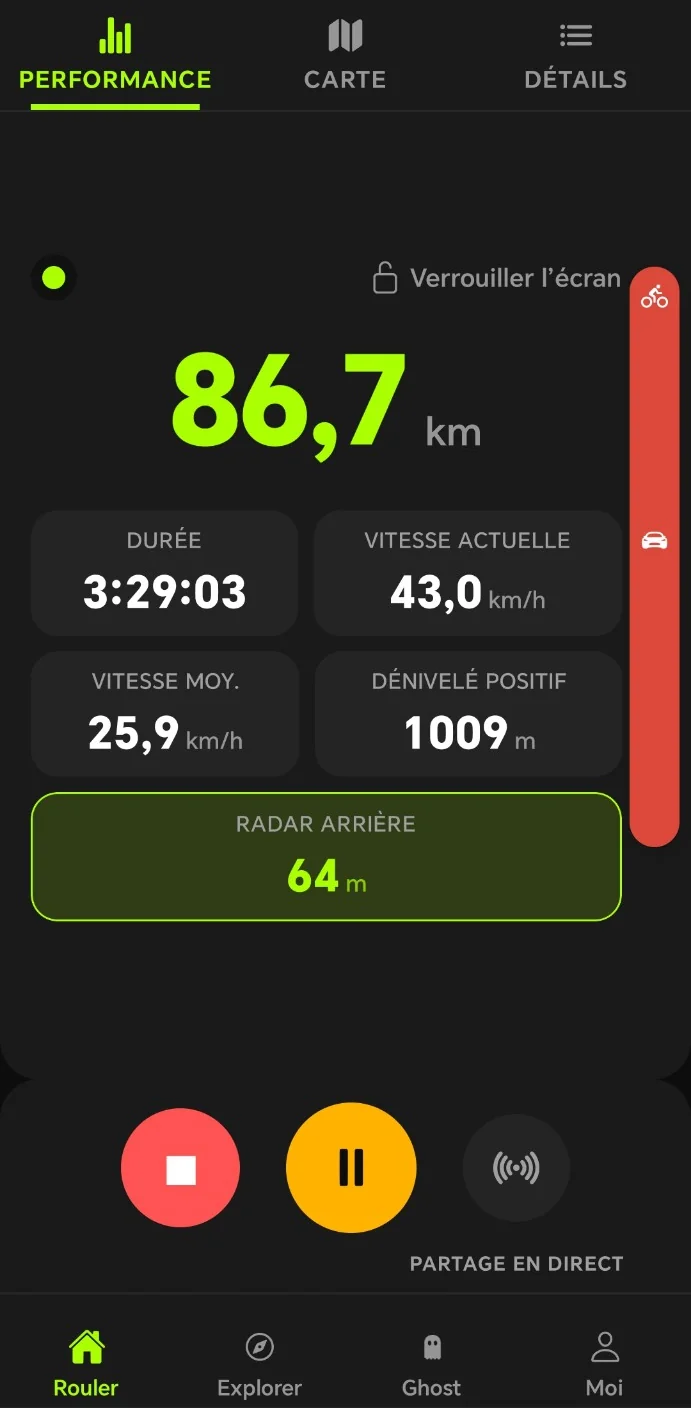
During the ride, a bar on the right edge of the screen shows approaching vehicles: green when the road is clear, orange when a vehicle is coming, red when it is coming fast.
Rear radar
Drafto connects to your rear radar over Bluetooth. Vehicles coming up behind you appear along the edge of the screen, with a sound, and a voice when it gets dangerous. No bike computer needed.
During the ride
During the ride, a bar on the right edge of the screen shows approaching vehicles: green when the road is clear, orange when a vehicle is coming, red when it is coming fast.
A beep announces each new vehicle, two rising notes the clear road. If a vehicle approaches fast or close, the phone vibrates and a voice warns you, even with the voice coach off.
The “Rear radar” tile shows the distance to the closest vehicle. It disappears when the road is empty.
It’s a safety matter. Heart rate straps, power meters, cadence and speed sensors are part of Premium.
Getting started
A radar already linked to a bike computer refuses any other connection: its blue LED shows it. If the app asks you to put the radar in pairing mode, repeat step 1.
Questions
No. Your phone is enough: Drafto connects straight to the radar over Bluetooth, with no bike computer or other app.
Garmin Varia radars, and those that speak the same Bluetooth language: Bryton Gardia, Magene, iGPSPORT.
A radar already linked to a bike computer refuses any other connection: its blue LED shows it. If the app asks you to put the radar in pairing mode, repeat step 1.
Yes, with or without Premium. It’s a safety matter. Heart rate straps, power meters, cadence and speed sensors are part of Premium.
Yes, in the voice coach settings: vehicle announcements, beeps and vibration are set separately. The radar stays free and active: these three settings only change how it warns you.
Drafto is free on iPhone and Android, in 11 languages.
Discover Drafto And to know where to ride: a loop in seconds